Expected Coverage by Outside Signal
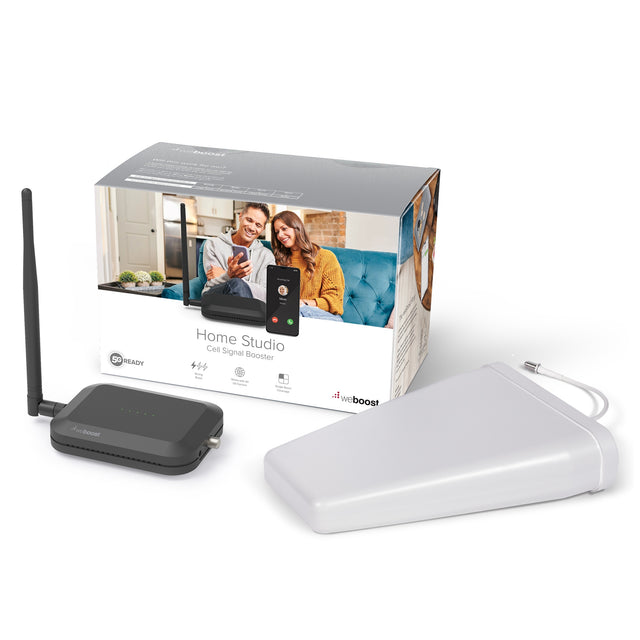
weBoost 470166 Home Studio Signal Booster Kit
Included with your order:
- 90-Day Returns
- Lifetime Tech Support
- 2-Year Warranty
- Lowest Price Guarantee


Get your questions answered, fast & free
Signal SpecialistMon to Fri, 9 to 5 ET

Boosts 5G and 4G LTE on Every US Carrier, Including:


MVNOs like Mint, Cricket, and Visible run on these networks too, along with more than 90 regional carriers.
Introducing the Home Studio
At a glance
How Much Coverage Should You Expect?
The existing outside signal strength and the amplifying power of the booster together determine how much coverage you'll get.
No signal outside? A booster needs a small amount of signal to amplify, so if you truly do not have anything outside, a booster won't solve your problem.
Need more coverage than this?
If you need more than one room covered, move up to a more powerful system. Our recommendations:


How It Works
The booster receives the existing cell signal from nearby towers, amplifies it, and broadcasts it into the room. It also works in reverse, boosting the signal from your phone back to the tower, so calls hold up in both directions.


The Outside Antennacommunicates back and forth with nearby cell towers.

The Amplifier and Inside Antennaboosts any cell signal it receives from the outside antenna, then broadcasts it throughout the room that it's in.
Questions on How to Install It?
Our team is here to answer any questions you have, including where the outside antenna should go, how to route the cable, and where the booster belongs.
Rather talk it through before you buy? Call us at 1-888-974-8237.

How the Installation Process Works
One antenna goes outside, one cable comes in, and the booster sits in the room you want fixed. Most installs need only basic tools.
Place the Booster
Attach the whip antenna to the booster and place it in the room where you need stronger signal. It needs to be near an outlet for power.
Mount the Outside Antenna
Mount the antenna outside with the included L-bracket. The U-bolts clamp it to an existing pole or a roof vent pipe, which keeps aiming easy, and mounting on the side of the building works if the signal there is strong.
Aim It at the Nearest Tower
Point the outside antenna toward your nearest cell tower. A tower finding app like Open Signal shows you where that is. The aim matters more than anything else in this install.
Run the Cable
Connect the white RG6 cable to the outside antenna, route it inside, and connect it to the booster. Finger tighten the connections only. A second 30 foot cable is included if you need more length.
Power Up and Fine Tune
Plug in the power supply, ideally through a surge protected power strip, and check the light: green means the system is working. For the most coverage, rotate the outside antenna an eighth of a turn at a time, powering the booster off and on between turns, until the bars near the booster peak.
Keep the Antennas Apart It's recommended that the outside antenna has at least 50 horizontal or 20 vertical feet of separation from the booster (or a combination of the two). Distance prevents oscillation (feedback) from occurring and reducing performance.
Which Home Booster Is Right for You?
Same three part system at every size. What changes is amplifier strength and how many rooms it reaches.


What's Included
Everything below ships together.
-

weBoost Home Studio 60 dB Amplifier with Whip Antenna
-

Wide-Band Directional Antenna with F-Female Connector
-

2 x White RG6 Coax Cables with Barrel Connector
-

Antenna Hardware Mounting Kit
-

Power Supply


The Support That Comes With It
Installation Support
Our team has decades of combined experience guiding customers through the installation process.
Troubleshooting & Optimization
Our team is here to help you fix problems and maximize system performance.
Lifetime Support
We're here to provide help and guidance for as long as you run the system.
Specifications
The forwardable facts, jargon translated.
| Warranty | 2 Years |
| Gain (Up/Down) | |
| Max Coverage | |
| Frequencies Supported | 700MHz, 800MHz, 1900MHz, 1700/2100MHz |
| Outside Antenna Type | Directional |
| Inside Antenna Type | Omnidirectional |
| Number of Inside Antennas | 1 Inside Antenna |
| Impedance | |
| Power Requirements |
For the careful reader
The documents, before you buy.
weBoost Home Studio Installation Guide weBoost Home Studio Spec Sheet weBoost Home Studio One PagerRegulatory Advisories
The FCC requires the advisory below on every consumer signal booster, including this one.
This is a CONSUMER device.
BEFORE USE, you MUST REGISTER THIS DEVICE with your wireless provider and have your provider's consent. Most wireless providers consent to the use of signal boosters. Some providers may not consent to the use of this device on their network. If you are unsure, contact your provider. You MUST operate this device with approved antennas and cables as specified by the manufacturer. Antennas MUST be installed at least 20 cm (8 inches) from any person. You MUST cease operating this device immediately if requested by the FCC or a licensed wireless service provider. WARNING. E911 location information may not be provided or may be inaccurate for calls served by using this device.
Please note, the three largest carriers (AT&T, T-Mobile, and Verizon) and more than 90 regional carriers have given blanket consent for use of all boosters certified to the current FCC standards. Registration itself is a quick form on your carrier's website, not a permission request, so for nearly every buyer approval is already in place.
Why Buy from Us
You're not just buying a booster. You're getting the team behind it.


Call before you buy, during your install, or any time after. When something's wrong, our team is here to support you.
Reviews
Some of these reviews also appear on other versions of this booster, because they are the same hardware. Critical reviews stay visible, and we answer them.