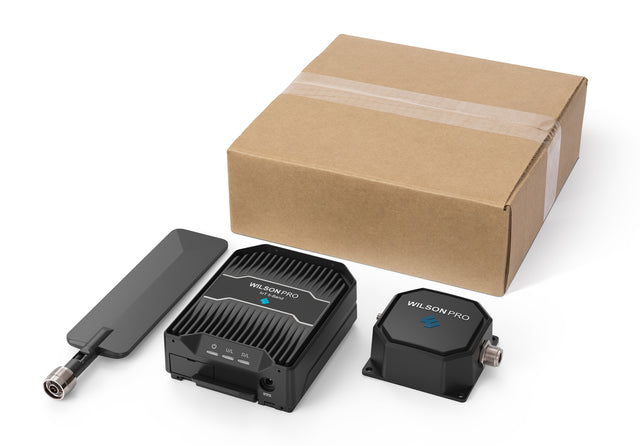
WilsonPro IoT 3.0 Direct-Connect Cellular Signal Booster for IoT Devices and Modems | 460079
Your Order Includes:
- 90-Day Returns
- Lifetime Tech Support
- 3-Year Warranty
- Lowest Price Guarantee
Product Overview
Product Overview
The WilsonPro IoT 3.0 is the perfect solution for improving the performance of IoT devices like ATMs, vending machines, security systems, and LTE/5G hotspots. It’s also a game-changer for homes and businesses using cellular modems or routers with built-in cellular connectivity, especially if those devices are positioned in areas with poor signal.
Why Choose the WilsonPro IoT 3.0?
The IoT 3.0 is built for reliability and versatility by addressing common connectivity challenges. Here’s why it stands out:
- Power Over Coax (PoC): Simplifies installation by running power and signal through a single coaxial cable. This allows the amplifier to be placed in the best possible boosting position, even when it's far from a power source.
- Direct Amplifier Power Option: If you don't want to use PoC, you can power the amplifier directly with the included power supply.
- Wide Compatibility: Includes adapter cables for SMA, MCX, and MMCX connections, so it's compatible with most IoT devices, including security systems, modems, vending machines, ATMs, sensors, and more. If you’re not using PoC, you may need an N-Male adapter to connect your device to the amplifier.
- Fail-Safe Operation: A built-in passive RF bypass keeps your device connected even if the amplifier loses power.
- Carrier Agnostic: Supports all major U.S. carriers, including Verizon, AT&T, and T-Mobile.
Perfect For:
- IoT Devices: Boosts connectivity for ATMs, kiosks, vending machines, and more.
- Security Systems: Improves the reliability of cellular-based alarms, monitoring devices, and access devices, like gates.
- Cellular Modems and Modem/Router Combos: Ensures strong signal and fast data speeds for cellular modems and routers in your home or business, especially if they’re located in weak-signal areas.
- Industrial and Commercial Applications: Reliable signal for IoT devices, like sensors, in warehouses, factories, and remote installations.
Coverage and Setup:
Unlike standard boosters that broadcast a signal over a large area, the IoT 3.0 connects directly to the antenna port on the device that needs better signal, so the boosted signal is fed right into the device without any loss.
Here is how you would set up the IoT 3.0 with Power over Coax (PoC):
- Locate the PoC unit near the device that needs boosted signal and near an outlet.
- Connect the appropriate adapter cable to the antenna port of the device that needs boosted signal and then to the port on the PoC unit.
- Connect the 20 ft cable with N connectors to the other port on the POC unit and run to the location where the amplifier will be located.
- Connect the cable to the appropriate port on the amplifier unit and connect to the included antenna to the other port.
- Plug in the power adapter to the PoC unit and the system should automatically start boosting signal to your IoT device.
Key Specs:
- Maximum Gain: 15 dB
- Uplink Power: Up to 24 dBm
- Power Options: 12V DC with PoC or direct input
- Dimensions: 5.4 x 4.2 x 1.4 in
- Weight: 1.58 lbs
In the Box
In the Box
Supported Carriers
Supported Carriers
Product Documents
Product Documents
Specifications
Specifications
-
SKU460079
-
UPC810005965125
-
ConditionNew
-
Warranty3 Years
-
Impedance
-
Gain (Up/Down)
-
Frequencies Supported700MHz, 800MHz, 1700/2100MHz, 1900MHz
-
ConnectorN-Male
Regulatory Advisories
Regulatory Advisories
This is a CONSUMER device.
BEFORE USE, you MUST REGISTER THIS DEVICE with your wireless provider and have your provider's consent. Most wireless providers consent to the use of signal boosters. Some providers may not consent to the use of this device on their network. If you are unsure, contact your provider. You MUST operate this device with approved antennas and cables as specified by the manufacturer. Antennas MUST be installed at least 20 cm (8 inches) from any person. You MUST cease operating this device immediately if requested by the FCC or a licensed wireless service provider. WARNING. E911 location information may not be provided or may be inaccurate for calls served by using this device.
Please note, the three largest carriers (AT&T, T-Mobile, and Verizon) and more than 90 regional carriers have given blanket consent for use of all boosters certified to the current FCC standards.